Checking your remaining SCOM MBs is essential to avoiding unexpected overages and ensuring you have plenty of data for daily use. Monitoring SCOM's remaining MBs will help you stay within your plan limits and improve your future expense planning.
Check your SCOM remaining MBs by using either the quick SCOM MBs check code or the SCOM app applications. This blog has procedures in it that can be used to solve your problem, so be sure not to miss them out.
What is the USSD code for checking SCOM balance?
It is as easy as dialing a USSD code to check the balance of your SCOM account. Here are the steps you need to follow:
- You can access the dial pad on your mobile phone by opening it
- To access the USSD code, dial *125#
- Let us know what happens after a few seconds. A screen will display your balance
Check SCOM balance with SCO's mobile app
You can view information about your SCOM account using the SCO Mobile App, including your balance. For more information, please refer to the following instructions:
- Go to the Google Play Store or Apple App Store and download the "SCO Mobile App".
- Register in the app by opening it and following the instructions.
- The account you created is now available to you.
- The home page of SCOM allows you to view your balance.
SCOM Balance Check via Customer Service
Alternatively, you can call the SCOM helpline to speak with a representative. To utilize this service, you must pay the standard call charges.
- You can reach us by dialing 111-726-726 from your SCOM number
- Customer service representatives can assist you if you follow the voice prompts
- If you would like your balance checked, please ask the representative
How to Check SCOM Remaining Data through Online or By SMS
Several methods exist for SCOM users to find out how much MB they have left in their accounts. It depends on the method and how it is utilized. For instance, the SCOM MBs check code may not work the same for all methods, and the SCOM app may not work for all methods.
1. Check Remaining Data through SMS
SCOM remaining MBs can be checked by running a single USSD code. SCOM remaining MBs can be checked by following the above-mentioned procedure.
- You can open the dialer pad in the dialer app by clicking on it.
- You will need to type the code *125#.
- You will be prompted to type 1 after you have followed the instructions.
- In response to your reply, you'll receive a message telling you how much SCOM internet balance you have left.
2. Check Remaining Data through Online - SCOM App
Another easy way to check SCOM's remaining MBS is by using the SCOM app, which gives SCOM administrators access to detailed information in one place. Here are the steps to check SCOM MBs using the SCOM app.
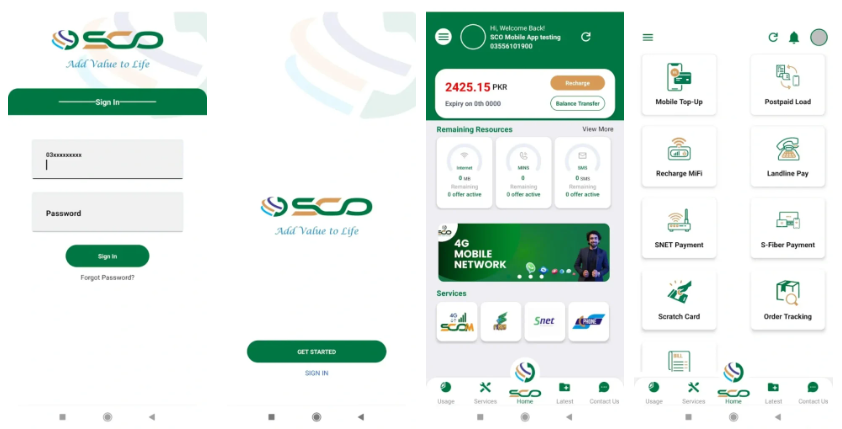
- Get the SCOM app by downloading it first
- The app must be activated once it has been installed
- Signing in or entering your credentials will let you complete the registration process
- SCOM's remaining internet balance can be viewed on the home page after signing in
Checkout: My Telenor Test Your Skills Today
FAQs
i. Where can I find my remaining Internet data?
Android users can check their data usage by following these steps:
- Your smartphone's Settings app can be found there.
- Find a data option or something similar.
- Go to the data usage section by tapping on connections.
ii. Code for SCOM Packages monthly?
With these plans, you get plenty of minutes for calls and SMSs as well as a high data limit. You can enjoy uninterrupted internet service for 30 days by dialing 1113#. When you dial 1115#, you can activate the monthly SMS package if you are a heavy SMS user.
iii. What is the procedure for checking my data balance?
It is vital to keep track of your data balance in order to manage your internet usage efficiently. Now all MTN, Airtel, Glo, and 9Mobile users can check their data balance using *323#.


Comments